
How to log in Facebook in China
How to log in Facebook in China
chrome for facebook
大家一起来Facebook吧(How to log in Facebook in China)
** Chrome翻墙设置**
1.首先下google chrome浏览器去. (1. Download “google chrome” explore program)
下载地址: http://www.google.com/chrome/?hl=zh-CN (Download Address)
2.装好浏览器以后开始装proxy switchy这个插件 (Install “google chrome” and install another program “proxy switchy”) https://chrome.google.com/extensions/detail/caehdcpeofiiigpdhbabniblemipncjj
点install就好了.完成后地址栏右边有个地球标识。
(2. Install the proxy program https://chrome.google.com/extensions/detail/caehdcpeofiiigpdhbabniblemipncjj
After installing the program, you will find a globe next to the address bar)
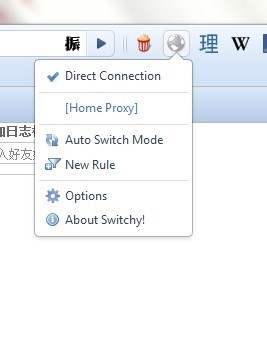
3.点地球 (3. Click the globe):
点Option 出现 (Click “Option”)
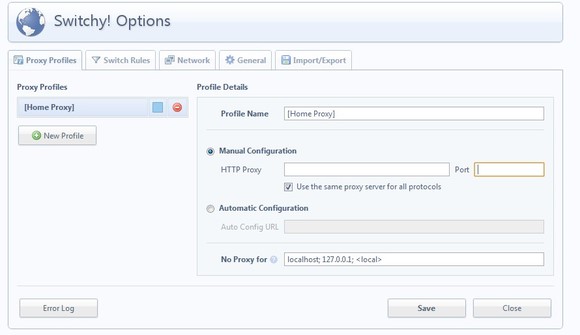
4.点左边绿色标识: New Profile, 然后你可以取名字,也可让它用默认名.
(4. Creat a new profile, and name the new profile)
5.邮编Manaul Configuration下面的HTTP Proxy填上代理IP 以及PORT号码。
(5. Fill in Manaul Configuration HTTP PROXY(IP) & PORT number. )
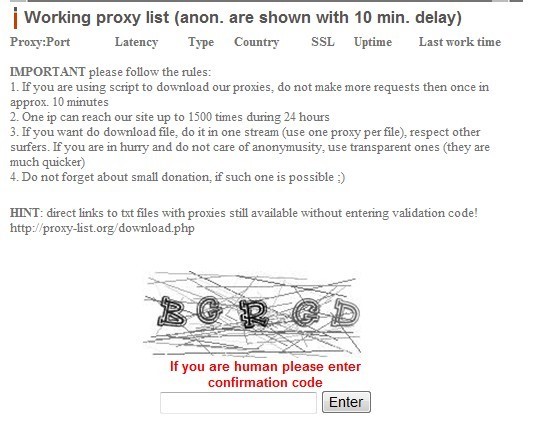
6.代理IP地址获取,请进这个网站http://www.proxy-list.org/en/index.php
(6. Reques for HTTP PROXY(IP) & PORT number, please go to this website**:�**�http://www.proxy-list.org/en/index.php )
页面往下稍微拖点就能看到如下画面:
(Fill in the confirmation code, then you will get the IP address)
输入验证码就能看到如下:
(After fill in the confirmation code, you will see this kind of image)
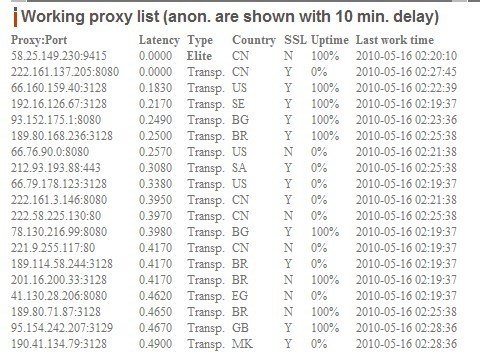
冒号前面的就是IP 后面的就是PORT号码,国家我一般选US,UPTIME我选的是100%
(Take the first Poroxy as an example: 58.25.149.230:9415 –seperate by** :**
HTTP PROXY(IP) = 58.25.149.230
PORT Number = 9415
Choose PROXY with “ up time 100%” )
7.勾上下面的Use the same proxy server for all protocol.
(7. After fill in all the information, Click “Use the same proxy server for all protocol”.)
8.点上面一排的Switch Rules,出现
(8. Click the other bar “Swith Rules” )
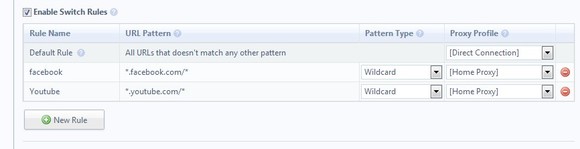
先勾上Enable Switch Rules, 在点New Rule. 同样你可以取名字。我添加的new rule是facebook和youtube. 在URL栏下面跟我一样输就好了,然后proxy profile下拉栏里面选上你新建的那个。
(Click “Enable Swith Rules”, then creat a “New Rule”. Name it Facebook or Youtube. Click Proxy Profile, pick the profile you just created.)
9.在点地球
(9. Click the globe again)
会有你新建的profile出现,这个时候点Auto Switchy Mode.就是说在你设定的那些RULE的网站下才启动代理。这样完全不会影响你上国内网站的网速!
(You will find you have new profile, then click “Auto Switchy Mode”, then you can try to go on Facebook!)
启动代理时地球会变成蓝色,没有启动时是灰色的。
(When you are using the proxy services, the globe will turn blue. For the rest of time, the globe will stay grey. )
