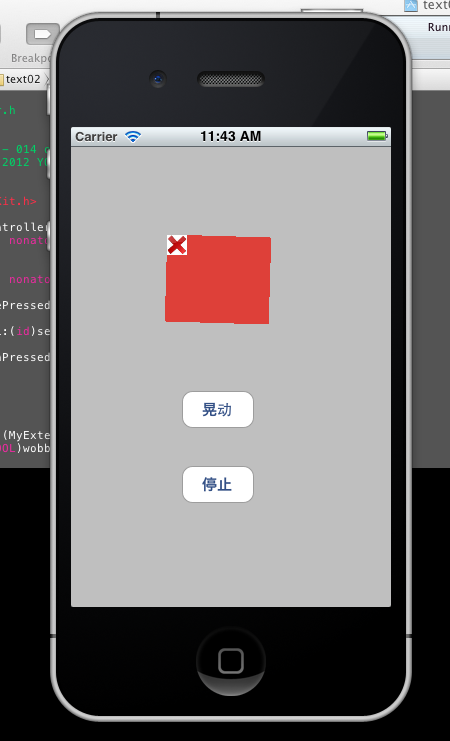
IOS 实现 UIView 晃动 删除的 效果
IOS 实现 UIView 晃动 删除的 效果
Ios动画相关 Ios炫丽效果
IOS 实现 UIView 晃动 删除的 效果
// 方法一:
- //
- // ViewController.h
- // text02
- //
- // Created by YQ - 014 on 9/3/12.
- // Copyright (c) 2012 YQ - 014. All rights reserved.
- //
- #import <UIKit/UIKit.h>
- @interface ViewController : UIViewController
- @property (retain, nonatomic) IBOutlet UIView *handle;
- @property (retain, nonatomic) IBOutlet UIButton *deleteButton;
- - (IBAction)deletePressed:(id)sender;
- - (IBAction)cancel:(id)sender;
- - (IBAction)buttonPressed:(id)sender;
- @end
- @interface UIView (MyExtension)
- - (void)wobble:(BOOL)wobble;
- @end
- //
- // ViewController.m
- // text02
- //
- // Created by YQ - 014 on 9/3/12.
- // Copyright (c) 2012 YQ - 014. All rights reserved.
- //
- #import “ViewController.h”
- @implementation UIView (MyExtension)
- - (void)wobble:(BOOL)wobble
- {
- if (wobble){
- self.transform = CGAffineTransformMakeRotation(-0.1);
- [UIView animateWithDuration:0.12
- delay:0.0
- options:UIViewAnimationOptionRepeat|UIViewAnimationOptionAutoreverse|UIViewAnimationOptionAllowUserInteraction|UIViewAnimationOptionCurveLinear
- animations:^{
- self.transform = CGAffineTransformMakeRotation(0.1);
- } completion:nil];
- }
- else{
- [UIView animateWithDuration:0.25
- delay:0.0
- options:UIViewAnimationOptionAllowUserInteraction|UIViewAnimationOptionBeginFromCurrentState|UIViewAnimationOptionCurveEaseOut
- animations:^{
- self.transform = CGAffineTransformIdentity;
- } completion:nil];
- }
- }
- @end
- @interface ViewController ()
- @end
- @implementation ViewController
- @synthesize handle;
- @synthesize deleteButton;
- - (void)viewDidLoad
- {
- [super viewDidLoad];
- // Do any additional setup after loading the view, typically from a nib.
- deleteButton.enabled = NO;
- deleteButton.hidden = YES;
- }
- - (void)viewDidUnload
- {
- [self setHandle:nil];
- [self setDeleteButton:nil];
- [super viewDidUnload];
- // Release any retained subviews of the main view.
- }
- - (BOOL)shouldAutorotateToInterfaceOrientation:(UIInterfaceOrientation)interfaceOrientation
- {
- return (interfaceOrientation != UIInterfaceOrientationPortraitUpsideDown);
- }
- - (void)dealloc {
- [handle release];
- [deleteButton release];
- [super dealloc];
- }
- - (IBAction)deletePressed:(id)sender {
- [self.handle removeFromSuperview];
- }
- - (IBAction)cancel:(id)sender {
- deleteButton.enabled = NO;
- deleteButton.hidden = YES;
- [handle wobble:NO];
- }
- - (IBAction)buttonPressed:(id)sender {
- deleteButton.hidden = NO;
- deleteButton.enabled = YES;
- [handle wobble:YES];
- }
- @end
// 方法二:
- CABasicAnimation *shake = [CABasicAnimation animationWithKeyPath:@”transform”];
- shake.duration = 0.13;
- shake.autoreverses = YES;
- shake.repeatCount = MAXFLOAT;
- shake.removedOnCompletion = NO;
- CGFloat rotation = 0.03;
- shake.fromValue = [NSValue valueWithCATransform3D:CATransform3DRotate(self.layer.transform,-rotation, 0.0 ,0.0 ,1.0)];
- shake.toValue = [NSValue valueWithCATransform3D:CATransform3DRotate(self.layer.transform, rotation, 0.0 ,0.0 ,1.0)];
- [self.layer addAnimation:shake forKey:@”shakeAnimation”];
// 效果 如下