
nginx反向代理做cache配置
- 1. nginx反向代理做cache配置
- 2. proxy_set_header Accept-Encoding “”; 这个也可
- 3. !/bin/sh
- 4. location ~ .*.(html|gif|jpg|jpeg|png|bmp|swf|js|css)$
- 5. {
- 6. proxy_cache cache_one;
- 7. proxy_cache_valid 200 304 12h;
- 8. proxy_cache_valid 301 302 1m;
- 9. proxy_cache_valid any 1m;
- 10. proxy_cache_key $host$uri$is_args$args;
- 11. proxy_set_header Host $host;
- 12. proxy_set_header X-Real-IP $remote_addr;
- 13. proxy_set_header X-Forwarded-For $remote_addr;
- 14. proxy_set_header Accept-Encoding “”;
- 15. proxy_pass http://my_server_pool;
- 16. expires 1h;
- 17. }
nginx反向代理做cache配置
Nginx cache
nginx反向代理做cache配置 
(2010-02-01 17:26:24)
正文开始
前序:请耐性子看完,前面的这个配置可以达到按后缀名进行缓存,但无法被purge。后面的配置可以被purge。
具体实施方案按个人情况而定。
需要第三方的ngx_cache_purge模块:
wget http://labs.frickle.com/files/ngx_cache_purge-1.0.tar.gz
tar zxvf ngx_cache_purge-1.0.tar.gz
nginx机器IP地址:192.168.2.187
编译参数: configure arguments: –add-module=../ngx_cache_purge-1.0 –prefix=/usr/local/nginx –with-http_stub_status_module –with-http_ssl_module
user nobody;
worker_processes 1;
pid logs/nginx.pid;
worker_rlimit_nofile 65535;
events {
use epoll;
worker_connections 65535;
}
http {
include mime.types;
default_type application/octet-stream;
log_format main ‘$remote_addr - $remote_user [$time_local] ‘
‘“$request_method $scheme://$host$request_uri $server_protocol” $status $body_bytes_sent ‘
‘“$http_referer” “$http_user_agent”‘;
server_names_hash_bucket_size 128; #指定服务器名称哈希表的框大小
client_header_buffer_size 32k;
large_client_header_buffers 4 128k; #以上两个是设定客户端请求的Header头缓冲区大小,对于
cookie内容较大的请求,应增大改值。(400或414错误)
client_max_body_size 8m; #允许客户端请求的最大单文件字节数
client_body_buffer_size 32k; #缓冲区代理缓冲用户端请求的最大字节数,可以理解为保存
到本地再传给用户
proxy_connect_timeout 600; #nginx跟后端服务器连接超时时间(代理连接超时)
proxy_read_timeout 600; #连接成功后,后端服务器响应时间(代理接收超时)
proxy_send_timeout 600; #后端服务器数据回传时间(代理发送超时)
proxy_buffer_size 32k; #设置代理服务器(nginx)保存用户头信息的缓冲区大小
proxy_buffers 4 32k; #proxy_buffers缓冲区,网页平均在32k以下的话,这样设置
proxy_busy_buffers_size 64k; #高负荷下缓冲大小(proxy_buffers*2)
proxy_temp_file_write_size 1024m; #设定缓存文件夹大小,大于这个值,将从upstream服务器传
递请求,而不缓冲到磁盘
proxy_ignore_client_abort on; #不允许代理端主动关闭连接
sendfile on;
tcp_nopush on;
keepalive_timeout 65;
tcp_nodelay on;
gzip on;
gzip_min_length 1k;
gzip_buffers 4 16k;
gzip_http_version 1.0;
gzip_proxied any; 前端是squid的情况下要加此参数,否则squid上不缓存gzip文件
gzip_comp_level 2;
gzip_types text/plain application/x-javascript text/css application/xml;
gzip_vary on;
server_tokens off;
#注:proxy_temp_path和proxy_cache_path指定的路径必须在同一分区
proxy_temp_path /cache/proxy_temp_path;
#设置Web缓存区名称为cache_one,内存缓存空间大小为200MB,1天没有被访问的内容自动清除,硬盘缓存空间大小为30GB。
proxy_cache_path /cache/proxy_cache_path levels=1:2 keys_zone=cache_one:200m inactive=1d max_size=30g;
upstream my_server_pool {
server 192.168.11.6:80;
}
server {
listen 80 default;
server_name _;
return 500;
access_log off;
}
server {
listen 80;
server_name testA.domian.com testB.domian.com testC.domian.com testD.domian.com;
access_log logs/access.log;
location / {
proxy_set_header Host $host;
proxy_set_header X-Real-IP $remote_addr;
proxy_set_header X-Forwarded-For $proxy_add_x_forwarded_for;
proxy_set_header X-Forwarded-For $remote_addr;
proxy_pass http://my_server_pool;
expires 12h;
}
#扩展名以.gif、.jpg、.css等结尾的静态文件缓存。
location ~ .*.(gif|jpg|jpeg|png|bmp|swf|js|css)$
{
#如果后端的服务器返回502、504、执行超时等错误,自动将请求转发到upstream负载均衡池中的另一台服
务器,实现故障转移。
proxy_next_upstream http_502 http_504 error timeout invalid_header;
proxy_cache cache_one; #进行缓存,使用Web缓存区cache_one
proxy_cache_valid 200 304 12h; #对不同的HTTP状态码设置不同的缓存时间
proxy_cache_valid 301 302 1m;
proxy_cache_valid any 1m;
proxy_cache_key $host$uri$is_args$args; #以域名、URI、参数组合成Web缓存的Key值,Nginx根据
Key值哈希,存储缓存内容到二级缓存目录内
proxy_set_header Host $host;
proxy_set_header X-Real-IP $remote_addr;
proxy_set_header X-Forwarded-For $remote_addr;
proxy_set_header Accept-Encoding “none”; #设定proxy_set_header Accept-Encoding ‘’;
(或是后台服务器关闭gzip),这样这台机器才
不会缓存被压缩的文件,造成乱码
proxy_set_header Accept-Encoding “”; 这个也可
proxy_ignore_headers “Cache-Control” “Expires”; #这段配置加上后,proxy_cache就能支持后台设
定的expires。
proxy_pass http://my_server_pool;
expires 1h;
}
location ~ ^/NginxStatus {
stub_status on;
access_log off;
if (-d $request_filename){
rewrite ^/(.*)([^/])$ http://$host/$1$2/ permanent;
}
}
location ~ ^/(WEB-INF)/ {
deny all;
}
#设置只允许指定的IP或IP段才可以清除URL缓存。
location ~ /purge(/.*) {
allow 127.0.0.1;
allow 192.168.0.0/16;
allow all;
proxy_cache_purge cache_one $host$1$is_args$args;
}
error_page 500 502 503 504 /50x.html;
location = /50x.html {
root html;
}
}
}
测试结果正常,第一次访问时,nginx和后端反向squid都有请求日志。当请求过一次后,nginx的/cache目录下多出缓存文件,并且再次请求页面(请过浏览器缓存),后端squid没有请求日志,说明是nginx提供的cache。
但是以上的配置不能使用purge命令,比如缓存了http://testA.[domain.com/css.css使用](http://domain.com/css.css%E4%BD%BF%E7%94%A8)
http://testA.domain.com/purge/css.css却由后端tomcat返回了404页面。参考了同事的blog,发现自己确实不善于思考了,明明之前有一个清除squid脚本的例子了…
[root@test1 proxy_cache_path]# cat cache_purge.sh
!/bin/sh
cache_dir=/cache/proxy_cache_path
grep -ra $1 ${cache_dir} | awk -F’:’ ‘{print $1}’ >/tmp/cache_list.txt
for file in cat /tmp/cache_list.txt
do
rm -f ${file}
done
rm -f /tmp/cache_list.txt
这样通过执行./cache_purge.sh css.css 或./cache_purge.sh testA.domain.com/css.css就把缓存清掉了!
[root@test1 proxy_cache_path]# grep -ar “testA.domain.com/images/200807_button_3.gif“ */
e/e2/5b7880ae1d30d6d23f0666e0b926ce2e:KEY: testA.domain.com/images/200807_button_3.gif
[root@test1 proxy_cache_path]# ./cache_purge.sh testA.domain.com/images/200807_button_3.gif
[root@test1 proxy_cache_path]# grep -ar “testA.domain.com/images/200807_button_3.gif“ */
上述的脚本转自:http://www.[wenzizone.cn/?p=330](http://wenzizone.cn/?p=330)
记录一下:
问题一:开始的实验环境是nginx自己处理静态文件,将动态文件也proxy_pass到本机,及:
upstream tomcat {
ip_hash;
server 192.168.2.187:8080;
}
但是始终都缓存不上。
改成nginx作为负载均衡,反向代理时:
upstream tomcat {
ip_hash;
server 192.168.2.189:8080;
}
发现可以缓存上了。
[root@test1 data0]# ll *
proxy_cache_path:
total 4
drwx—— 3 nobody nobody 4096 Feb 2 14:09 3
是我的操作失误?还是nginx作为web服务器时,不能缓存自己?
问题二:就是上面所说的
比如缓存了http://testA.[domain.com/css.css](http://domain.com/css.css)
问题二解决:这段解释来自于:http://raocl.[spaces.live.com/blog/cns!3F6CFF93FD0E3B79!825.entry](http://spaces.live.com/blog/cns!3F6CFF93FD0E3B79!825.entry)
因为nginx提供的过期控制是针对http_status_code的,我本想通过location中限定类型的方法完成曲线救国,结果发现:一旦location中限定了文件类型,缓存过期的定义就失效!!
#也就是说,限定文件类型后的哈希缓存,是绝绝对对的强制永久缓存——不单过期失效,下面的purge也失效——或许换一个场景,这个刚好有用。
所以换了一个配置:
server {
listen 80;
server_name testA.domian.com testB.domian.com testC.domian.com testD.domian.com;
access_log logs/access.log;
location / {
proxy_next_upstream http_502 http_504 error timeout invalid_header;
proxy_cache cache_one;
proxy_cache_valid 200 304 12h;
proxy_cache_valid 301 302 1m;
proxy_cache_valid any 1m;
proxy_cache_key $host$uri$is_args$args;
proxy_set_header Host $host;
proxy_set_header X-Real-IP $remote_addr;
proxy_set_header X-Forwarded-For $proxy_add_x_forwarded_for;
proxy_set_header X-Forwarded-For $remote_addr;
proxy_set_header Accept-Encoding “”;
proxy_pass http://my_server_pool;
expires 12h;
}
location ~ .*.(html|gif|jpg|jpeg|png|bmp|swf|js|css)$
{
proxy_cache cache_one;
proxy_cache_valid 200 304 12h;
proxy_cache_valid 301 302 1m;
proxy_cache_valid any 1m;
proxy_cache_key $host$uri$is_args$args;
proxy_set_header Host $host;
proxy_set_header X-Real-IP $remote_addr;
proxy_set_header X-Forwarded-For $remote_addr;
proxy_set_header Accept-Encoding “”;
proxy_pass http://my_server_pool;
expires 1h;
}
#这部分定义不缓存而是透传的请求类型。介于无法通过类型来控制缓存,那么这里不缓存的控制就必须确保严格正确了
location ~ .*.(php|jsp|cgi)?$ {
proxy_set_header Host $host;
proxy_set_header X-Forwarded-For $remote_addr;
proxy_pass http://my_server_pool;
}
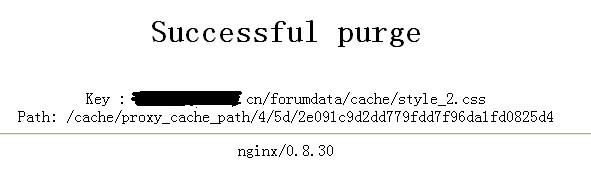
这样一来的意思就是说缓存所有,除了我定义的php,jsp,cgi,当然能不能被缓存还要决定web服务器的header头了,至此。终于见到了久违的页面:
